Japanese Forms, Foreign Names, and Why They Don't Mix
After getting my drivers license, I tried to sign up for car sharing. Every form wanted my name in a different format. I wanted to understand why.
Getting my Japanese drivers license felt like the finish line. Then I tried to sign up for a car sharing app.
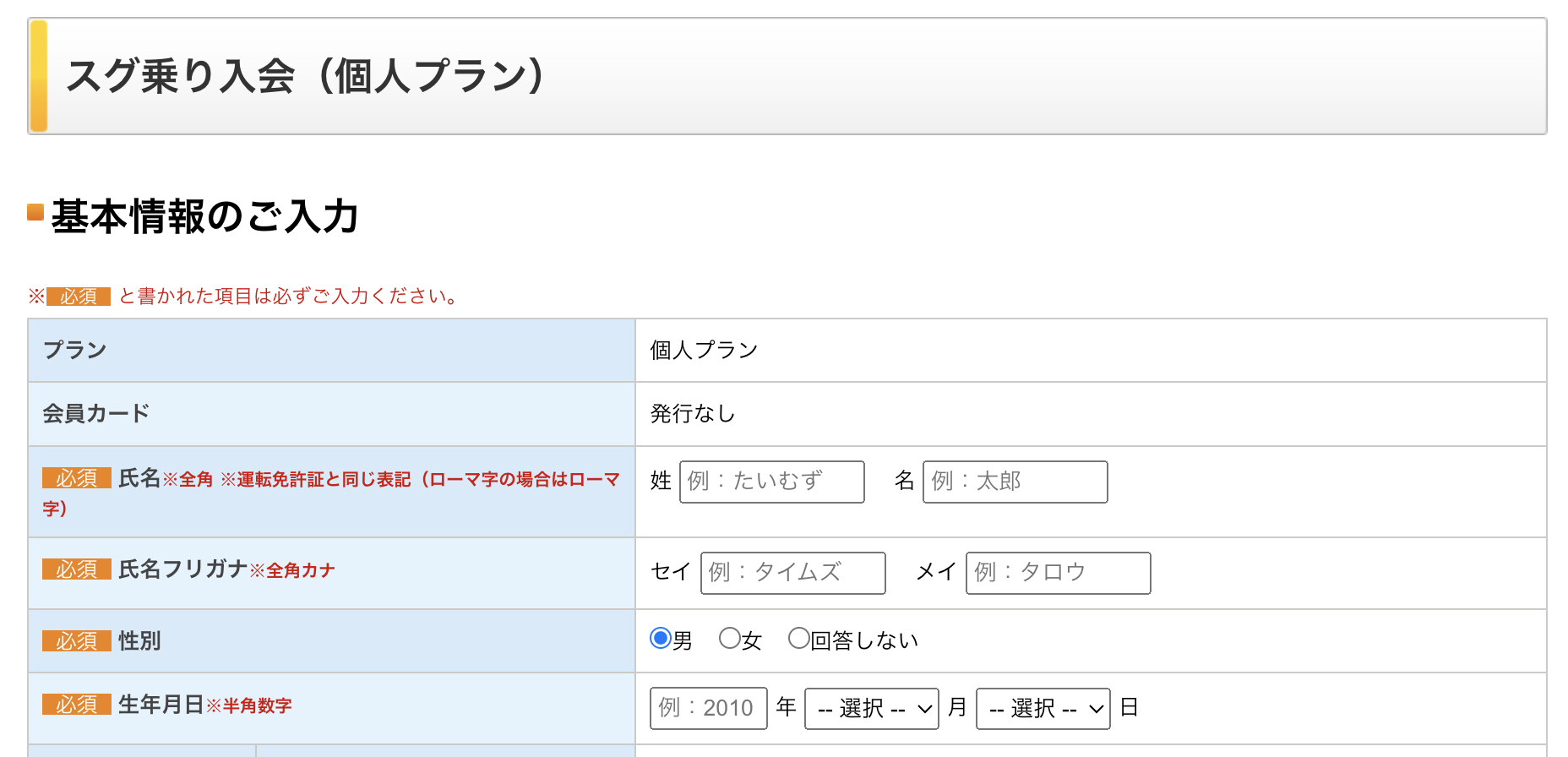
The registration form had four name fields. The first two asked for my name exactly as printed on my drivers license: 姓 (sei, family name) and 名 (mei, given name). Below them, a 氏名フリガナ (shimei furigana, name reading) row asked for the same name again in katakana.
I filled in all four fields, hit submit, and got an error. The form didn’t say which field it was rejecting or why.
After a few tries I figured out the problem. The name fields required full-width characters (全角, zenkaku), and I had typed my romaji on a regular keyboard, which produces half-width letters. The form wanted Marcelo (“Marcelo” in full-width), which looks almost the same but is a completely different set of characters, and a lot of forms reject the wrong width without telling you.
That was annoying enough to make me wonder why the system was built this way.
Why Japanese forms ask for furigana
Japanese names can’t be read from kanji alone. The same characters can be pronounced differently depending on the person.
田中 (Tanaka) rarely causes confusion, but a name written with the kanji for “spring” could be read as Haru, Shun, or something else entirely depending on the family. Some kanji combinations have dozens of legitimate readings in actual use.
The furigana field is how forms solve this. It’s a phonetic annotation: here is how you actually pronounce this.
The form collects both the written form (kanji) and the spoken form (kana) as separate fields because they’re used for different things. The kanji version appears on documents and displays. The kana version is what gets read aloud and used for sorting.
For a foreign name like mine, there’s no kanji, so the kanji field gets the romaji and the kana field gets the phonetic approximation. The form was designed for Japanese names. Foreign names get squeezed into whatever’s closest.
Why half-width katakana still exists
Full-width katakana (マルセロ, “Marcelo”) and half-width katakana (マルセロ, “Marcelo”) are both in the Unicode standard, but they come from different eras of Japanese computing.
Half-width katakana is older than it looks. It comes from JIS X 0201, a Japanese standard from 1969, written for hardware that could only spare one byte per character.
Kanji ran to thousands of characters and would never fit in one byte, so the standard kept only katakana, which had been the convention for Japanese telegrams since the 1800s. Early terminals and bank systems wrote everything in it.
Shift-JIS arrived in the 1980s and kept those one-byte katakana for backward compatibility, adding two-byte codes for kanji and full-width kana. Database columns sized in bytes inherited the split. Banking systems, insurance databases, and municipal government record systems got built on that constraint.
Here is my name in both widths under Shift-JIS:
| Format | Text | Bytes |
|---|---|---|
| Full-width katakana | マルセロ | 8 |
| Half-width katakana | マルセロ | 4 |
Same name, half the storage. When a column is capped at 20 bytes, that difference decides whether your name fits at all.
The split applies to Latin letters too. Regular ASCII letters are half-width, and the two-byte encodings added full-width copies (Marcelo) so romaji could line up with Japanese text in the same column. That full-width romaji is what the car sharing form wanted from me.
Those systems haven’t been replaced. The web form you’re filling out in 2026 might be a React app sitting on top of a 1998 database where a column is still sized for single-byte characters. The form accepts full-width input, converts it somewhere in the pipeline, and sometimes the conversion fails silently and your registration just doesn’t work.
The phonetic mismatch problem
Converting a foreign name to katakana follows how the name sounds, not how it’s spelled. “Marcelo” becomes マルセロ (“Marcelo” in katakana) because that’s the closest phonetic fit in Japanese. But different converters apply different rules, and the output isn’t always the same.
When you register in Japan, an official writes down a katakana reading of your name. That becomes your canonical version across municipal systems. If you type a slightly different rendering on a form because your auto-converter made different choices, some systems will reject it.
My municipal record has me as マルセロ (“Marcelo”). A form that converts my name differently and checks it against that record will fail, even though both spellings are phonetically reasonable.
I built a small tool, and you probably don’t need it
There are plenty of online converters that do this. ChatGPT handles it well. Converting a foreign name to katakana takes less than 30 seconds with any of those tools.
I built this because I was annoyed and curious. The car sharing form failed on me three times before I figured out the full-width issue, and I wanted to understand the encoding history behind it. Once I traced the Shift-JIS backstory, building a converter that showed every version side by side was how I got it to stick.
The tool mirrors the three form layouts I kept running into: one full-name box, last plus given, or last, first, and middle. It’s pre-filled with my name. Replace it with yours, adjust the katakana if the auto-conversion misses (it will sometimes), and copy the version the form wants.